Developer and maintainer
Fable UI
A copy-and-own registry for AI-intent-aware product interfaces — give the agent a trusted menu, not a blank canvas.
Live MVP exploring typed tool calls, model-facing manifests, and trusted UI surfaces for AI product workflows.
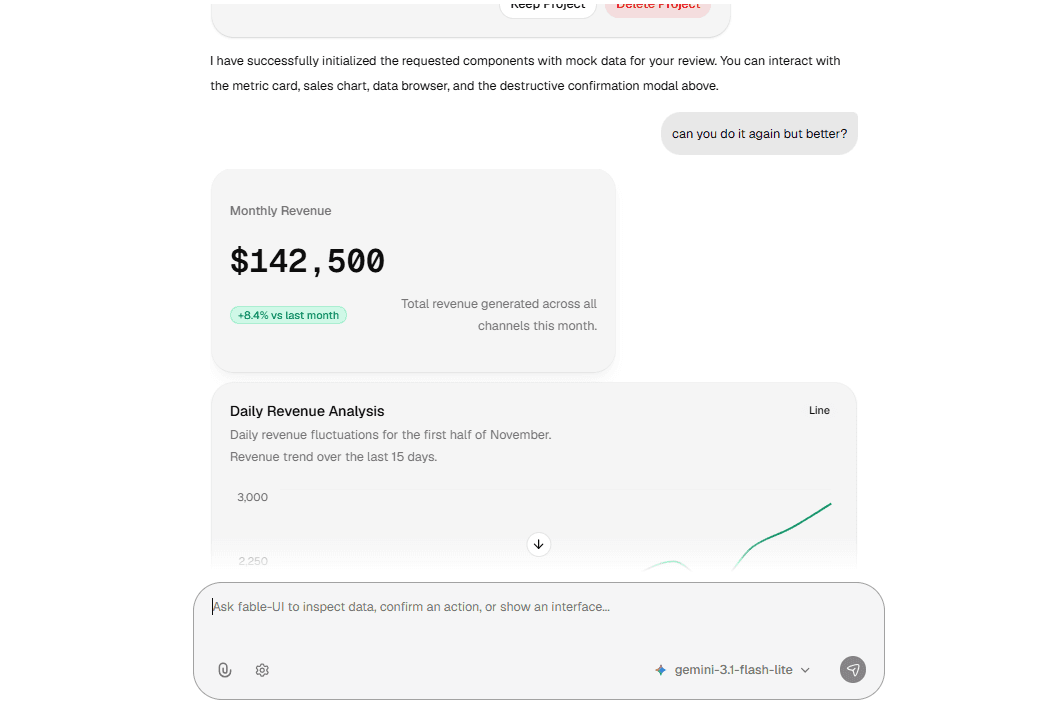
Fable UI started from a simple irritation: every AI interface was turning into a chat box, even when the task clearly needed something better than text.
Chat is good at language. It's good at intent. It's good at letting a user say something before they know which screen, filter, or workflow they actually need. But a lot of product work was never meant to be experienced as prose.
If a user asks for today's revenue, they shouldn't have to extract the number from a paragraph. If they ask for open orders, they shouldn't get handed a fragile markdown table. If they're about to refund an order, they shouldn't receive a confident sentence where the product actually needed an explicit confirmation step.
That's the problem Fable UI is trying to solve.
It's a copy-and-own registry of AI-intent-aware product experiences. Each installable item pairs React UI with a Vercel AI SDK tool definition, a Zod schema, a model-facing manifest, examples, docs, and eval prompts where they matter. The assistant doesn't get to invent arbitrary UI at runtime — it chooses from trusted surfaces the app has explicitly installed and allowlisted. The host app still owns reality: data access, authentication, authorization, validation, side effects, business logic.
That separation is the whole project.
The Problem
The first wave of AI product integration usually looks the same everywhere: add a chat box, stream model responses, maybe add tool calls, render the answer as text or markdown. That's enough to make a demo feel alive. It is not enough to make product work feel native.
The weird part is that chat creates an illusion of flexibility while quietly collapsing the interface down to a single shape: text. Text is genuinely useful when the user wants explanation, synthesis, ambiguity, or reasoning. But product work usually needs affordances — a metric needs hierarchy and context, a record set needs columns and sorting and filtering and pagination and row detail, a risky operation needs confirmation, missing structured input needs a form, a workflow needs safe next actions.
Markdown can imitate some of that. It cannot carry component state, disabled controls, app-owned validation, permission-aware actions, detail surfaces, or design-system behavior.
The other tempting answer is arbitrary AI-generated UI or code. That's powerful, but it introduces a different problem: inside a production product, the model shouldn't become the designer, the frontend engineer, the product manager, and the security boundary all at once.
Fable UI takes a narrower bet:
For many AI product workflows, the model does not need unlimited UI generation. It needs a trusted menu of installed, typed, allowlisted product surfaces.
That smaller idea is a lot easier to trust.
The Core Insight
The central insight behind Fable UI is that the component was never the unit of value. The product surface is.
A useful AI-aware surface includes the visual component, sure, but it also needs the contract wrapped around it: What tool name can the model call? What payload shape is valid? When should the model reach for this surface, and when should it stay away? Which neighboring tool should win in an ambiguous case? What safety boundary does the host app still own? How do invalid, loading, empty, and disabled states render? How can a developer even test whether the routing works?
Without that contract, a component library is just a component library wearing AI vocabulary. With it, the component becomes something an AI agent can actually use, without ever owning the whole product.
The model expresses intent. The schema validates the payload. The renderer maps the tool part to a React component. The host app decides what data is safe, what action is allowed, what business rule applies. That gives the assistant agency without giving it authority.
Product Architecture
The core flow stays intentionally plain:
User prompt
AI model
Fable tool call
schema validation
tool router
React component
rendered UI
In a Vercel AI SDK route, the host app registers Fable tool definitions with streamText. Depending on what the app has installed and registered, the model can choose a tool like show_metric, show_chart, show_table, show_data_browser, collect_input, request_confirmation, or show_next_actions.
The important detail: the AI route only ever passes the AI SDK tool object.
const tools = {
  show_metric: showMetric.tool,
}
The full Fable definition also carries renderer information, and that stays on the client/UI side, where streamed tool parts actually get rendered. Every Fable component exports a definition through defineFableComponent(...), which connects the stable tool name, the Zod schema for the tool payload, the Vercel AI SDK tool definition, and the renderer — the mapping from tool states to React props.
The renderer handles both the normal AI SDK states and Fable-specific metadata: loading while input is streaming, empty when the host marks the tool part empty, error when the tool fails or the payload doesn't pass validation, disabled when the host wants to lock the controls, and ready once the payload parses cleanly.
This matters because AI tool output can never be treated as a normal trusted prop. Fable validates again before rendering, every time. Unknown tools and invalid payloads produce safe fallback UI — not broken chat state, and not blind component execution.
Registry Item as the Unit of Value
Fable UI borrows the shadcn copy-and-own registry model because these files genuinely need to belong to the host app. An installable item is never just a React component — it can include UI source, a tool schema, an AI SDK tool definition, a renderer contract, a model-facing manifest, docs and examples, eval prompts, and optional integration glue. That whole bundle is the product behavior.
Copy-and-own matters here because the developer needs to be able to inspect the code. Tool descriptions influence model behavior. Manifests influence routing. Schemas define what data is even allowed to cross from the model into the UI. A product team should be able to tune those files for its own domain, instead of accepting a black-box runtime it can't see inside.
A restaurant POS, a CRM, and a finance dashboard may all need a data browser. They shouldn't have to share the same model-facing examples, row actions, or safety language. The registry gives the starting point. The host app keeps ownership.
The First Product Surfaces
The first surfaces are best understood as conversational moments, not a random set of components.
MetricCard is for one primary number — a total, count, amount, percentage, balance, SLA value, or KPI. Its tool name is show_metric. The boundary is intentionally narrow: it should never handle records, tables, browsing, forms, confirmations, destructive actions, or long explanations. That narrowness isn't a limitation — it's exactly what makes the tool legible to the model.
DataBrowser is the strongest proof of the thesis, because it addresses the place where chat-only UI is obviously weak: records. The docs describe two related tools — show_table for static snapshots when rows are already available, and show_data_browser for richer browsing over rows or a registered host-owned resource. show_table fits bounded answers like recent orders, matching invoices, or top customers. show_data_browser fits exploration: search, filters, sorting, pagination, row detail, row actions. It can use static rows, but the more important path is resource-backed browsing through an allowlisted resource id. The model should only ever receive a safe resource manifest — never raw SQL, Firestore collection paths, REST endpoints, secrets, or permission rules.
Charts renders static, display-ready chart data as line, bar, or pie charts, using Recharts and shadcn chart conventions. Its tool name is show_chart. The model should reach for it when already-known safe data reads more clearly as a visual trend, comparison, or part-to-whole breakdown — live or private data still has to be fetched, authorized, and validated by the host app before any chart payload gets rendered. This is a useful expansion because not every structured answer belongs in a table; sometimes the right shape is visual.
ConfirmationCard asks the user to approve a host-owned side effect before it runs. Its tool name is request_confirmation. The key boundary here is blunt on purpose: confirmation is not authorization. A confirmation UI can help a user make an explicit decision before a refund, delete, send, charge, status change, or other destructive action — but the backend still has to enforce authentication, authorization, validation, idempotency, and business rules. The UI captures intent. The server decides what is actually allowed.
FormCard collects a small number of structured fields mid-conversation. Its tool name is collect_input. It exists for missing values, not long multi-step workflows — the docs list supported field types like text, number, select, date, textarea, and toggle. The host app receives submitted values and validates them before any side effect runs. The model is never trusted as the validator.
SuggestedActions renders prompt-only next steps. Its tool name is show_next_actions. Clicking an action sends action.prompt as the next normal user message, through the same chat flow — it never calls host APIs directly, executes writes, or bypasses the model. That's what keeps it a workflow-continuation surface instead of an automation surface in disguise.
Key Architecture Decisions
The useful parts of Fable UI mostly come from its constraints, not its features.
Use the shadcn registry before a custom CLI. The shadcn model already solves the distribution shape Fable needs: install source, own it, inspect it, customize it. Building a custom CLI first would add surface area before the core product contract is even proven.
Keep registry source independent from the demo app. The registry can't depend on playground-only helpers, docs routes, local chat routes, or app-specific code. The product boundary is the public registry item — the demo app can prove it works, but the registry files themselves have to stay host-safe and portable.
Tool schemas are the payload's source of truth. The schema defines what the model is allowed to pass, and it protects the renderer from malformed tool parts. The same payload contract should be visible to the model, the route, the renderer, and the component docs alike.
Use AI SDK UI patterns first. The initial direction leans on Vercel AI SDK UI patterns — registered tools, streamed tool parts, client-side rendering — which keeps the implementation close to how most Next.js teams already build AI chat interfaces.
Stay protocol-light in v1. AG-UI, A2UI, and MCP Apps are all relevant future interoperability paths, but the first product wedge is smaller than a protocol layer. Fable UI needs to prove the registry item, manifest, schema, and renderer contract before it tries to become a runtime standard.
Keep host authority explicit. Fable UI is not a database layer, a permission system, an agent framework, a prompt-to-code tool, or a chat provider. This point is worth repeating: the model can request a UI or action flow, but the host application still owns auth, data access, side effects, and validation.
Manifest Design
The manifest is the missing primitive.
A tool description has to stay short, since it travels directly with the AI SDK tool. A manifest can afford to be richer — it explains the product boundary in a way both humans and models can actually use. A strong manifest defines the tool name and component name, use-when and do-not-use-when rules, neighboring tools to prefer, trigger and anti-trigger and conflict prompts, the payload shape, safety notes, and eval prompts.
This matters more as the registry grows. Without good manifests, the model reaches for the nearest tool instead of the right one — a metric card stealing table prompts, a data browser stealing confirmation prompts, a chart visualizing something that should have stayed private until the host had fetched and validated it. Triggers and anti-triggers aren't decorative copy. They're product behavior.
Data Layer Boundary
DataBrowser is where the architecture gets serious. The resource model is the actual product boundary between the assistant and host-owned data.
A resource can describe its id, label, entity label, visible columns, allowed filters, allowed sort fields, search behavior, row actions, and agent-facing guidance. But the model should never receive source. Source configuration can hold private driver details — REST endpoints, Firestore collection templates, SQL view names, adapter-specific settings — and that belongs to the host app and driver, not to the prompt.
The registry resolves a resourceId into a driver and resource. The driver fetches authorized rows using host-owned context like orgId, tenantId, auth state, and server-side validation. Optional drivers currently include REST and Firebase. The REST driver can attach a bearer token if host context provides one; the Firebase driver relies on the live Firebase Auth client passed during driver registration, and does not use bearer tokens from FableDataProvider.
The model selects from an allowlisted catalog. It must never invent resource ids, SQL, Firestore queries, raw endpoints, collection paths, authorization decisions, or backend operations. That's the hard boundary the whole system is built around.
Testing and Evals
Testing Fable UI is not only a rendering problem.
The registry needs the normal frontend confidence — schema tests, component states, loading/empty/error/disabled rendering, invalid payload behavior, integration tests with mock tool parts, install and dry-run validation. But AI-aware components need another layer entirely: selection reliability.
For each surface, the project needs prompt suites — positive prompts that should select the tool, anti-triggers that should not, and conflict prompts where a neighboring tool should win instead. For show_metric, "What is today's revenue?" should pass, "Show the last ten orders" should not, and "Compare revenue by week" might prefer a chart or a table depending on the shape of the data.
That kind of testing isn't academic. It's product infrastructure. If the model can't reliably choose the right surface, the UI can look polished and still be wrong.
Current Status and Roadmap
The docs currently describe Fable UI as a public shadcn registry with a production quickstart, core renderer helpers, AI SDK integration, model-facing manifests, and installable surfaces including core, metric-card, suggested-actions, confirmation-card, form-card, data-browser, charts, rest-driver, firebase-driver, and quickstart.
Some older wording in the introduction and architecture docs still describes only MetricCard as current. Before publishing, that status should be checked against the actual repository.
The roadmap shape is clear enough: finish and harden the core registry items, keep manifest quality central, validate install DX, improve mock mode and playground reliability, build stronger eval harnesses, expand data-backed resources carefully, and treat protocol interoperability as future integration rather than initial product foundation.
The important discipline throughout is simple: don't present future potential as shipped product.
Lessons and Tradeoffs
Fable UI is a tradeoff in favor of trust. A small, trusted registry is less flexible than arbitrary UI generation. It is also safer, easier to reason about, and considerably more product-like.
The hard part was never just rendering components. The hard part is defining reliable boundaries between surfaces and making those boundaries testable. Manifests require real discipline. Data access boundaries have to stay strict. Install DX has to be real, not just documented. And the whole thing only proves itself through examples that show the surfaces working inside actual host apps.
The project can also drift too broad, too fast, if it tries to be a chat framework, agent runtime, data adapter layer, protocol bridge, and component registry all at once. The wedge has to stay sharp:
trusted UI surfaces that models can select through typed tool calls and model-facing manifests.
Why It Matters
Fable UI is a bet that AI-native product interfaces will not be pure chat. But it's also a bet that they don't need to be fully generated apps every time either.
There's a middle path: installed, owned, typed product surfaces that an assistant can choose reliably. That middle path respects both the user and the product. The user gets intent-driven software. The developer keeps control. The model becomes a router between what the user wants and the interface shape that can actually support the work.
The durable model is simple:
The agent expresses intent.
The registry exposes trusted surfaces.
The schema validates payloads.
The renderer maps tools to components.
The host app owns authority.
That's Fable UI at its clearest.